Read the public excerpt
The same instruction and worked examples appear here and in the printable PDF excerpt. You can request full guides for upcoming units below.
READ THIS FIRST
About this guide. Java meets you with a wall of small rules — integer division throws away remainders, substring counts from zero and excludes its endpoint, == answers a different question than .equals — and the students who struggle are rarely the ones who “can’t code.” They’re the ones who read code like prose instead of tracing it like a machine. This guide covers Unit 1 of the revised AP Computer Science A framework (effective Fall 2025): Using Objects and Methods, all 15 current topics, and a 15–25% weighting in the multiple-choice section. It is the unit every later unit stands on.
You will not find an if statement or a loop anywhere in these pages, and that is not an oversight. In the revised framework, selection and iteration belong to Unit 2. What is left here is the part almost everyone races past on the way to the “real” programming: what a value is, what a variable holds, and what each operator does with what it was actually handed — not what you meant to hand it. Many later confusions that start with the words “but I thought this variable was…” trace back to a Unit 1 rule that needs another pass.
If the symptom is about … | Start here |
|---|---|
division, casts, overflow, precision | Problems 1–3, 9 and the numeric cards |
String indices, output, exact assembly | Problems 3, 4, 7–9 |
objects, aliases, constructors, method calls | Problems 5, 6, 9 |
APIs, comments, signatures, null | Problem 9 and the contracts card |
designing and checking a method | Problems 7–9 |
Problem 1’s negative-remainder part is labeled Java enrichment because the current AP framework excludes a negative dividend for remainder questions. Reference identity in Problem 5 and numeric equality in Problem 9(f) anticipate Unit 2. The method implementations in Problems 7–8 and parameter reassignment in Problem 9(e) anticipate Unit 3. Those bridges make the Unit 1 object, signature, and finite-storage rules useful.
The pages that follow are your concept reference: a diagnostic decision tree and a Master Toolbox. Use them on demand rather than reading every card before you begin. Pick a problem from the route above, attempt it first, consult only the named card when you stall, and return to the full tree for a mixed trace. Work each problem before reading its solution — the “Before you compute” notes are there to catch a likely wrong turn while it is still visible.
One habit runs through all of it: write the state down. Use a variable table for running code, an index ruler for Strings, and boxes and arrows for objects. Tracing in your head can silently skip a step; these tools make the state visible and give you an independent check.
Every topic in the unit, and where it lives. The College Board lists fifteen; here is each one and the page that teaches it.
- 1.1 algorithms, the compile–run loop, the three kinds of error — cards 1 (p. 9) and 14 (p. 26); Problem 7.
- 1.2 variables and the three primitive types; primitive against reference — cards 2 (p. 11) and 3.
- 1.3 expressions, output, literals and escapes, precedence, / and % — cards 4, 5 and 13 (p. 14); Problems 1 and 3.
- 1.4 assignment and input — cards 1 and 3; Problem 3.
- 1.5 casting, the range of int, overflow and round-off — cards 6 and 7 (p. 17); Problems 2 and 9.
- 1.6 compound assignment, ++ and – — card 3 (p. 13); Problem 3.
- 1.7, 1.8, 1.9 APIs and libraries, comments and contracts, method signatures and overloading — card 9 (p. 21); Problems 7, 8 and 9.
- 1.10, 1.11 class methods and the Math class — card 12 (p. 24); Problem 6.
- 1.12, 1.13 objects as instances; new, constructors, references, null — cards 2, 10 and 11 (p. 22); Problems 5 and 9.
- 1.14 instance methods and the dot operator — cards 11 and 12; Problems 5, 6 and 9.
- 1.15 String objects and their methods — cards 8 and 13 (p. 20); Problems 4, 8 and 9.
WHERE THE POINTS GO ON THIS UNIT
In 2026, 25% of the cohort scored a 5 and 23% scored a 1 — more students took a 1 than a 3. The free-response section pays for production, not recognition: a student writes a working method or does not, and that separates a cohort instead of bunching it in the middle. Unit 1 decides which end a student is heading for, because it is where reading code like a machine is learned or skipped.
The two halves are related and they are not the same skill. A trace has to follow Java’s types, operators and state changes exactly; a written method has to do that and meet its contract. Practise both, in that order: say what the code does, then write code that does what the prompt asked.
Trace it on paper, because nothing runs. The College Board’s own note on this unit: “it is important for students to spend adequate time understanding and tracing code, especially for the multiple-choice section of the AP Exam,” and students should “write their program code on paper and trace it with different sample inputs before writing code on the computer.” The variable table, the index ruler and the boxes and arrows in this guide are that habit made visible; every distractor on the exam is built to match what the code looks like it does.
The first free-response question is named in this unit. It is “Methods and Control Structures,” and it “will require students to implement an algorithm that involves calling String methods” on a class the exam provides. Problems 8 and 9 are that question’s shape; the substring, indexOf and length habits earn its points, and a method that prints instead of returning earns none of them.
Read the signature before you call. Students “should practice identifying the proper parameters to use when calling methods of classes that are provided to them.” The Java Quick Reference is on the desk during the exam; the skill is matching the argument list — number, order, type — to the signature, and knowing that a void method cannot sit inside an expression.
Three things the exam will not ask, so do not spend the minute. A negative left operand of %; the prefix forms ++x and –x, or either inside another expression; and the five primitive types that are not int, double or boolean. Problem 1’s parts (e)–(f) are labeled enrichment for exactly that reason.
Diagnostic Decision Tree
HOW TO READ A CODE SEGMENT
Run through these questions in two passes. On the first pass, use the first “yes” to choose a primary workspace: a variable table, index ruler, or object diagram. On the second, apply every relevant check to the expressions inside that workspace. A single line can contain a cast, method call, division, and concatenation, so one match never cancels the others.
1. Am I asked what the code prints or returns? Don’t read it like a paragraph — run it like the machine: a variable table, one line at a time, values updated in the order written. Predicting from the general shape of the code is where wrong answers come from, because the general shape is exactly what the distractors are built to match. Problems 3, 5, 7.
2. Is there a / or a % anywhere? Name the type of each operand before evaluating anything. After confirming that the divisor is nonzero, int / int throws the remainder away, truncating toward zero; % takes its sign from the left operand. Integer division or remainder by zero instead throws ArithmeticException at run time. One double anywhere in that one operation changes everything about it. Note the phrase “that one operation” — a double elsewhere in the line does not help. Problems 1, 2, 3, 7.
3. Is there a cast? Decide exactly what it applies to before you evaluate anything. (int) and (double) grab only the very next value unless parentheses hand them more. (double)a/b and (double)(a/b) are different programs with different answers. Problems 2, 3, 6, 7.
4. Is it a String index question? Write the string out and number the characters from 0 before touching substring or indexOf. substring(a,b) includes index a, excludes index b, and has length b-a. Spaces count, and they are the character everyone forgets to number. Problems 4, 7–9.
5. Is something being compared? For primitives, == compares exact stored values. That is the intended tool for int and boolean; computed double values that are only approximately expected may need a tolerance instead. For references, == asks whether both variables hold the same reference. For String content, use .equals; for another class, read its API because its equality behavior may differ. Problems 5, 9.
6. Is a method being called? Match the call to its documented header. A class-qualified call (ClassName.method(...)) is static — it has no receiving instance, although it may use class state. A call documented as an instance method runs on its receiving object; it is conventionally written variable.method(...). Then ask the second question: does it return a value you must catch, or is it void? Problems 5, 6, 7, 9.
7. Is + touching a String? Evaluate left to right. From the first String onward, + stops adding and starts gluing — and everything after it gets glued, including numbers that were about to be added. Problems 3, 7–9.
Every question is also a secondary check. A trace can have a cast buried inside it; a String question can hide an integer division, and a method call can return the value that a later + consumes. When that happens, run the tree again on the smaller question, settle it, and come back to where you were.
Master Toolbox — Core Tools
ALGORITHMS, INPUT, AND THE WRITE–COMPILE–RUN LOOP
An algorithm is a finite, sequenced set of steps for completing a task or solving a problem. It can be represented in ordinary written language or with a diagram. Before it becomes code, sequencing matters: each step completes one at a time, in the stated order. A trace is simply an algorithm executed on paper.
An integrated development environment, or IDE, can help write, compile, and run a program. The compiler checks syntax and type rules; code containing a detected compile-time error must be repaired before it can run. Passing the compiler does not establish correctness. Test with specific data to expose logic errors, and distinguish those from a run-time error or exception that interrupts execution.
Input may be tactile, audio, visual, or text. Java’s Scanner class is one way to obtain keyboard text, but the current AP exam does not require a particular user-input form or a particular Scanner call. Whatever the source, input becomes values stored in variables; for example, boolean confirmed = true; stores one Boolean value that later code can use.
A check first. One question opens each of the next three cards and is answered where that card ends. Answer it before you read on; getting it wrong is the point, because that is what makes the card stick.
1. NAME THE COMPARISON
Two distinct String objects hold the same characters. What does == report, and what does .equals report? Say what each one is asking.
THE ONE IDEA UNDER EVERYTHING: TWO KINDS OF BOX
Every variable is a labeled box, and there are exactly two kinds. A primitive box (int, double, boolean) holds the value itself. A reference box (String, or any class type) holds either an arrow to an object that lives somewhere else or the special value null — never the object itself.
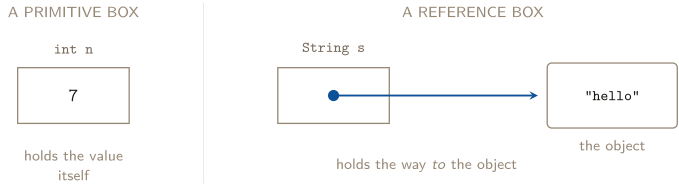
The dot is the arrow’s tail, and it lives inside the variable. The object is not in the box and never was.
Three consequences follow, and they organize much of the unit:
- Assignment copies what’s in the box — a value, an arrow, or null. int m = n; copies the number 7 and the two variables are then strangers. String t = s; copies the arrow, and now two variables point at one object.
- == compares what’s in the boxes. For primitives that is the exact stored value. It directly fits int and boolean; a computed double that is only approximately expected may need a tolerance. For objects that’s the arrows: true only when both variables hold the same reference; two null references also compare true. For Strings, .equals reads the characters. Other classes define their own documented equality behavior, or inherit identity-based equals from Object.
- A method called through a non-null reference travels down the arrow and acts on whatever it finds there — which may be an object that other variables also point at. Calling an instance method through null instead throws a NullPointerException.
The dependable rule is question-specific: use .equals for String content and compareTo for String order. Use == only when reference identity is actually the question. Problem 5 shows why == cannot stand in for String-content equality.
CHECK 1 — NAME THE COMPARISON
== reports false and .equals reports true, and neither one is wrong — they are answers to different questions. For a reference type, == compares what is in the box: the two arrows, which point at two different objects. .equals on String compares the characters those objects hold, and they match. So the question to settle before you pick an operator is identity or content: are you asking whether these are the same object, or whether they say the same thing? Almost every exam question wants content, which is why .equals is almost always the answer — and why the one place == belongs is a null check, where identity is genuinely the question. Problem 5 draws both.
TYPES, DECLARATIONS, AND THE COMPOUND ASSIGNMENTS
The three primitive types this unit uses. int — whole numbers, no fractional part, ever. double — real-number values represented with finite precision. boolean — true or false, nothing else. Their names are lowercase because they are built into the language. Class types — String, Counter, anything you or somebody else wrote — are capitalized by convention, and they are reference types.
A declaration builds the box; an assignment fills it. int a = 8; does both at once: make a box named a that can hold an int, and put 8 in it. The type is chosen once and never changes — an int box cannot later hold 3.5, and the compiler will refuse rather than round.
A literal has a type of its own, before any variable sees it. 5 is an int. 5.0 is a double. "5" is a String. Those are three different things, and the difference between the first two is what decides whether a division keeps its remainder. When you write 2.0 instead of 2 in a division, you are not decorating — you are changing which operation runs.
= is not equality. a = a + 1; is not a false statement about numbers; it is an instruction with two halves: evaluate the right side using the values that exist right now, then store the result in the box on the left, discarding whatever was there. Read every assignment right side first.
Compound assignment performs, converts, then stores.
You write | AP-level reading | Watch for |
|---|---|---|
a += c | add, convert to a’s type, store | a String on the left concatenates; an int on the left cannot store a String result |
a -= c | subtract, convert, store |
|
a *= c | multiply, convert, store |
|
a /= c | divide, convert, store | operand types still choose the division |
a %= c | remainder, convert, store |
|
a++ | a = a + 1 |
|
a-- | a = a - 1 |
For the same-type examples in this guide, the result matches the familiar long form. In full Java, however, compound assignment also converts the result back to the left variable’s type. Thus int a = 5; a /= 2.0; compiles and stores 2, while a = a / 2.0; does not compile without a cast. The left-hand location is also evaluated once, a distinction that matters for more complex expressions later in the course.
PRECEDENCE AND ORDER OF EVALUATION
Two separate questions, and mixing them up is its own error. Precedence says which operator claims which operands. Order says which one fires first among equals.
| Tier | Operators |
|---|---|
| 1 (tightest) | anything inside ( ); a cast (int) (double); unary - |
| 2 | * / % |
| 3 | + - (including + used as String glue) |
| 4 | == != |
| 5 (loosest) | = += -= *= /= %= |
The binary arithmetic and concatenation operators shown here evaluate left to right within a tier. That rule decides 17 / 5 * 5.0 (the division goes first, on two ints) and "total: " + a + b (the left + makes a String, so the right one can only glue). Both look like they should come out otherwise, and neither does.
Assignment comes after the right-side expression. The entire right side finishes before anything is stored — so the type of the variable on the left cannot reach backwards and change how the arithmetic ran.
Assignment expressions themselves associate right to left, but chained assignment expressions are outside the AP CSA scope.
INTEGER ARITHMETIC: / AND %
When both operands are int and the divisor is nonzero, the answer is an int — and an int has nowhere to put a fraction. So Java splits the result in two: / hands you the whole part and % hands you what was left over. Neither one is broken. Between them they lose nothing; take only one and you have thrown half the answer away.
| 17 / 5 3 | 17 % 5 2 | -17 / 5 -3 | -17 % 5 -2 |
The negative cases are the ones that surprise people, and the reason is one word: truncation is toward zero, not downward.
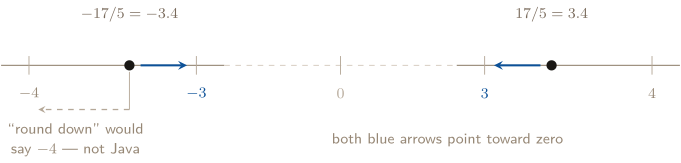
Truncation deletes the fractional part where it stands. It never moves a number away from zero, in either direction.
And % takes its sign from the left operand, which is not an arbitrary decision either. Java guarantees that the quotient and the remainder fit back together:
Check it both ways: , and . Once the quotient truncates toward zero, the remainder has no choice about its sign — it has to make up the difference back to a negative dividend, so it must be negative. This identity is also the fastest self-check you own: if your quotient and remainder don’t rebuild the number you started with, one of them is wrong and you know it in five seconds.
Scope and zero. The signed examples above describe Java, but a negative dividend for % is outside the current AP CSA exam scope. Integer division by zero is required knowledge: an expression such as 17 / 0 throws an ArithmeticException at run time. The program does not receive a quotient.
Two idioms worth recognizing on sight, because they show up everywhere later: for a non-negative n, n % 10 is its last digit and n / 10 is n with that digit removed. Together they take a number apart one digit at a time. (Negative n gives a negative last digit, for exactly the reason above.)
2. LOCATE THE CONVERSION
Compare (double)(7 / 2) with (double) 7 / 2. And then the question underneath both: can assigning the result to a double repair an integer division that has already happened?
CASTING: MOVING BETWEEN INT AND DOUBLE
Widening is automatic. An int can always be carried inside a double without losing anything, so Java promotes it for you the moment the two meet in one operation: 17 / 5.0 is real division, and the 17 becomes 17.0 on its way in. No cast needed, no permission asked.
Narrowing must be requested, and it truncates. Going the other way loses information, so Java refuses to do it silently — you have to write (int), which is you signing for the loss. And it chops rather than rounds, toward zero from both sides: (int) 7.9 is 7 and (int)(-7.9) is -7.
A cast grabs only the next value — it sits in the tightest precedence tier, alongside parentheses. This is where the two forms separate:
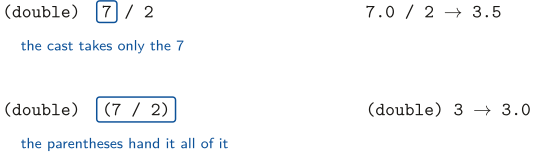
Same three numbers, same two operators, one pair of parentheses of difference — and the information is gone before the cast arrives in the second line.
A cast produces a value; it does not change a variable. After (int) x, the variable x is still a double holding exactly what it held before. The cast made a temporary int for that one expression to use.
The rounding idiom. The AP reference sheet hands you abs, pow, sqrt, and random — and no rounding method at all. So you build one:
| x | x + 0.5 | (int)(x + 0.5) | Why |
|---|---|---|---|
| 6.2 | 6.7 | 6 | short of 7, so truncation lands on 6 |
| 6.5 | 7.0 | 7 | exactly halfway — pushed over, rounds up |
| 6.78 | 7.28 | 7 | past the halfway mark, so it crosses |
| 6.99 | 7.49 | 7 | still short of 8, correctly |
Adding 0.5 moves every value that deserves to round up across the next whole number, and leaves every value that doesn’t below it. Truncation then does the rest. For negative x, subtract instead: (int)(x - 0.5), because “round away from the fraction” now points the other way — (int)(-6.78 + 0.5) is -6, which is wrong, and (int)(-6.78 - 0.5) is -7, which is right.
CHECK 2 — LOCATE THE CONVERSION
3.0 and 3.5, and no. In the first, the parentheses make 7 / 2 happen first: two ints, so int division, so 3 — and the cast then widens a 3 that has already thrown the remainder away. In the second the cast binds tighter than /, so the left operand becomes 7.0 before the division, one double makes the whole operation double, and you get 3.5. That is the general rule and it is worth saying in one line: the type of a division is decided when it happens, not when it is stored. double d = 7 / 2; puts 3.0 in d — the widening is real, and it is too late. Find the moment of the division, and make one operand a double before it.
FINITE STORAGE: INTEGER OVERFLOW AND DOUBLE ROUND-OFF
Java gives every int four bytes. Its inclusive endpoints are Integer.MIN_VALUE () and Integer.MAX_VALUE (). If an integer expression’s mathematical result lies outside that range, an integer overflow occurs. Java still stores an allowed int, but it may not be the mathematical value you expected:
Integer.MAX_VALUE + 1 Integer.MIN_VALUE
No compiler message announces the overflow. Before adding or multiplying large whole-number quantities, compare the possible result with the two named limits.
A double also has finite storage. Many decimal fractions cannot be represented exactly in binary, so the stored result is the nearest representable value. That round-off error is why 0.1 + 0.2 can produce 0.30000000000000004 rather than exactly 0.3. Use int when the quantity is inherently a whole-number count and must remain exact; for measured or fractional quantities, carry enough precision and round only as the task requires.
3. MARK THE CUT LINES
What does "scope".substring(1, 4) return? Get the endpoint from the rule, not from which word looks right.
STRINGS: INDEXING, SUBSTRING, IMMUTABILITY
A String is an object, and its characters are numbered from 0. Spaces are characters and get numbers like everything else. Every question in this family becomes reading rather than guessing the moment you draw the ruler.
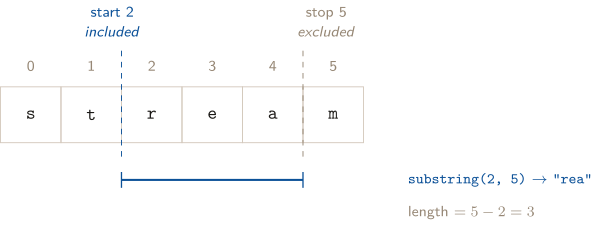
Read the two arguments as cut lines, not as characters: cut before index a, cut before index b, keep what is between. That is why the second endpoint is excluded and why the length is the subtraction.
| word.length() | number of characters (so the last index is length() - 1) |
|---|---|
| word.substring(a, b) | indices a through b-1 — length b-a |
| word.substring(a) | from index a to the end |
| word.indexOf(s) | index where the first occurrence of s begins; -1 if absent |
| word.equals(other) | true if the contents match, character for character |
| word.compareTo(other) | a negative int if word comes first in dictionary order, 0 if the two are identical, a positive int if word comes second. Read the sign, nothing else |
On compareTo, and what this guide does with it. It is on the AP Java Quick Reference, so the exam may hand it to you — and the reference sheet specifies only the sign, which means the sign is all you should ever reason from. The comparison runs left to right and stops at the first position where the two strings differ; if neither differs and one simply runs out, the shorter string comes first. Capital letters sort before lowercase ones, which is the result that surprises people: "Zoe".compareTo("ada") is negative. No problem in this guide exercises it, because every comparison here asks whether two things are equal — that is .equals’s job, not ordering. It is in the table so the reference sheet is not the first place you meet it.
Legal ranges, precisely. For substring(a, b) you need . Note the last one: b is allowed to equal the length, one past the last valid character index — that is how you say “to the end,” and it is legal precisely because b is a cut line rather than a character. An index outside that range is not a wrong answer, it is a crash: StringIndexOutOfBoundsException, at run time.
indexOf fails politely. It returns -1 rather than crashing when the argument isn’t there, and -1 was chosen because it is not a valid index — there is no way to confuse it with a real answer. It also reports where the match starts, and it matches the whole argument, so a partial match at an earlier position does not count.
Strings are immutable, and this is the fact with consequences. A String object cannot be modified after it is built. A method that appears to transform text returns a String result while leaving the original unchanged; the API does not promise that every such result has a fresh identity.
- Ignoring a returned String has no persistent effect on the variable. word.substring(0, 3); drops the returned reference. Store it in another variable or assign it back to word; neither operation modifies the original object.
- You can hand a String to any method without defending it. Nobody can alter it. This is why Strings are safe in a way that mutable objects (Problem 5’s Counter) are not.
The one-character idiom is substring(i, i + 1) — length , by the same subtraction as everything else. Escapes inside literals: \n (new line), \" (a quote that doesn’t end the string), \\ (a backslash).
String is in java.lang. A literal is the usual way to create one, but new String("hi") also calls a String constructor and creates a distinct String object containing the same characters.
CHECK 3 — MARK THE CUT LINES
"cop". Write the ruler out — s is 0, c is 1, o is 2, p is 3, e is 4 — and then put the two cut lines before index 1 and before index 4. What lies between them is characters 1, 2 and 3: cop. Index 4 is excluded, which is the whole content of “from is inclusive, to is exclusive,” and the length falls straight out of the subtraction: characters, always. Two habits protect this. Draw the ruler even when the string is five letters long, because the one you do in your head is the one that slips. And check the length against the subtraction before you check the letters — if they disagree, it is the letters that are wrong.
APIS, COMMENTS, CONTRACTS, AND SIGNATURES
A library is a collection of classes; related classes are grouped into a package. An application programming interface, or API, documents how clients may use those classes: their attributes, behaviors, constructors, methods, parameter types, return types, and stated conditions. The implementation may remain hidden. The Math and String classes belong to the java.lang package, which is available without an import.
Comments are ignored during execution but communicate intent: // begins a one-line comment, /* ... */ encloses a block comment, and /** ... */ is a Javadoc comment used to generate API documentation. A precondition must be true just before a method runs for its promised behavior to apply; the method is not required to check it. A postcondition states what must be true after a successful call, in terms of a return value or object state.
A method signature is its name plus its ordered list of parameter types; the return type is not part of the signature. A constructor signature uses the class name plus ordered parameter types. Methods or constructors are overloaded when one class supplies the same name with different signatures. Documentation tells you which one matches the number, order, and compatible types of the arguments.
A parameter is the local variable declared in a header; an argument is the value supplied at a call. Java uses call by value: a primitive argument copies its value, while an object argument copies its reference. The method can therefore mutate a shared object, but reassigning the parameter cannot retarget the caller’s variable. Control enters at the call and returns after return or the end of a void method.
OBJECTS: NEW, CONSTRUCTORS, AND READING A CLASS
A class is a description — what one object of that kind knows, and what it can do. Reading one is a four-line skill:
You see | It means |
|---|---|
private int count; | An instance variable: every object of this class gets its own separate count. Two objects, two counts, no connection. private means code within the declaring class can access it directly |
public Counter(int s) | A constructor — same name as the class, no return type written, ever. It runs once, during new, and its job is to put the new object’s instance variables into a sensible starting state |
public void increment() | A mutator: void means it hands nothing back, and what it does instead is change the object it was called on |
public int getCount() | An accessor: it changes nothing and hands back a value. A standard public route through which a client can learn about private state |
What new Counter(3) actually does, in order: builds a new object with its own set of instance variables; runs the constructor with the argument 3; and hands back an arrow to that object, which is what gets stored in your variable. In a trace of explicit constructor calls such as Problem 5, each successful new Counter(...) creates one Counter object. Other expressions and library code can allocate objects without a visible new, so do not turn that local counting tool into a rule about every object in a program.
void has no value, so it cannot be used as one. System.out.println( b.increment()); does not compile — not sometimes, not depending on anything else in the program. The message is ’void’ type not allowed here, and it is exactly right: there is nothing there to print. A void method is a command; a returning method is a question.
NULL, INHERITANCE, AND OBJECT TEXT
A reference variable may hold an object reference or the special literal null, meaning it currently refers to no object. The assignment Counter c = null; is legal. Calling an instance method through that reference, such as c.getCount(), throws a NullPointerException at run time because there is no receiving object. Merely declaring or assigning the null reference does not throw.
Related classes can share attributes and behaviors through inheritance: a subclass draws on a superclass. Every Java class ultimately inherits from the Object class. Designing and implementing inheritance relationships is outside the current AP CSA scope, but recognizing the relationship is not.
One inherited behavior explains object concatenation. When a String is concatenated with an object, Java uses that object’s toString method to obtain text. Every class has such a method through Object; a class may supply a more useful class-specific result. Implementing a toString override is outside the current exam scope, but using the documented result is required Unit 1 reasoning.
CALLING METHODS: STATIC, INSTANCE, AND THE MATH CLASS
The calls emphasized in this unit normally advertise their kind before the dot. A class method is typically called with the class name; inside its own class, that qualifier may be omitted. An instance method is called on an object expression. Java also permits the discouraged syntax of calling a static method through an instance, so the method’s documented header — not punctuation alone — is the final authority.
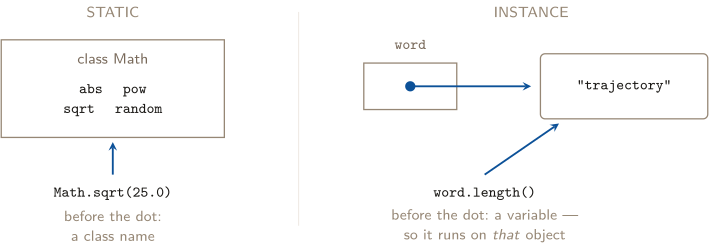
A static call has no receiving object, though it may use class state. An instance call has a hidden extra input — the receiving object itself.
- Constructor: new ClassName(args) — builds the object, runs the constructor, hands back the arrow.
- A returned value you don’t capture evaporates. The method still ran; the answer just went nowhere. Store it, print it, or use it inside a larger expression.
- The class-name rule is about the method, not the class. String does have static methods — String.valueOf(7) is one — so “String methods are instance methods” is not the rule. The rule is that length is a fact about a particular String, and a fact about a particular object needs that object.
The Math methods this unit leans on, with the return type that catches people:
| Call | Returns | Note |
|---|---|---|
| Math.abs(x) | same type as x | int in, int out |
| Math.pow(a, b) | double always | Math.pow(3, 2) is 9.0, not 9 |
| Math.sqrt(x) | double always | |
| Math.random() | double in | 0.0 is possible; 1.0 is not |
Build the random range rather than memorizing it, in three moves — scale, truncate, shift. For a positive integer range, (int)(Math.random() * range) + min produces the integers min through min + range - 1. Every time you use it, check the two ends by hand; the half-open interval is what makes the top end come out one lower than it looks.
THE + OPERATOR, AND HOW VALUES PRINT
+ has two entirely different jobs, and which one runs is decided operand by operand, at the moment that particular + fires:
| Left | Right | What + does |
|---|---|---|
| number | number | arithmetic; the result is a number |
| String | anything | concatenation; the result is a String |
| anything | String | concatenation; the result is a String |
Because + runs left to right, and because the result of a concatenation is itself a String, the first String in a chain converts every + after it. Nothing downstream can turn the gluing back off — but parentheses can protect arithmetic by making it happen first.
How the printed characters get chosen. An int prints as its digits and nothing else. A double always prints with a decimal point, even when the value is whole: the number 4 stored in a double prints as 4.0, and that .0 is part of the exact output. Otherwise Java prints the shortest run of digits that could only mean the value it is holding, which is why 12.75 prints as 12.75 and not 12.750000.
System.out.println versus System.out.print: println ends the line, so the next output starts below; print leaves the cursor where it is. Count your line breaks when the question asks for exact output — they are graded too.
THREE KINDS OF ERROR, AND WHICH ONE YOU ARE LOOKING AT
Naming the kind is most of the diagnosis, because each kind is found a different way.
Kind | When it appears | What it means |
|---|---|---|
Compile-time | Before the program ever runs | The grammar or the types don’t work. missing return statement, incompatible types, cannot find symbol. The program does not exist yet |
Run time | Mid-run, and it stops there | The code was legal but asked for something impossible with the actual values. StringIndexOutOfBoundsException is this unit’s example |
Logic | Never announced | It compiles, it runs, it finishes — and the answer is wrong. Examples are unintended integer division and an in-range wrong index |
The compiler checks grammar and types. It has no access to your intentions, so it cannot catch a mismatch between a legal computation and the intended algorithm. Integer division or an in-range off-by-one index is a logic error only when it produces unintended behavior; an out-of-range String index instead throws a run-time exception. Problem 7 contains one compile-time error and two logic errors, while Problem 4’s out-of-range case illustrates a run-time exception.
PROBLEM 1
One slash, two arithmetics: diagnosing division and remainder
A classmate insists Java “gets division wrong.” Evaluate each expression by hand — exact
value and type.
(a) 17 / 5 (b) 17 %
5 (c) 17.0 /
5 (d) 17 /
5.0
(e) -17 / 5 (f) -17 %
5 (g) 1 + 17 /
5 (h) 17 / 5 *
5.0
JAVA ENRICHMENT IN PARTS (E)–(F)
The signed results are real Java behavior and useful for debugging. The current AP CSA framework excludes a negative dividend in remainder questions, so part (f) extends beyond required exam recall.
BEFORE YOU COMPUTE
The whole problem begins with two checks: the divisor must be nonzero, then the operand types choose the arithmetic. Classify each operand: the operator behaves according to what the operands are, not what you meant them to be. With a nonzero divisor, two ints mean integer arithmetic, and one double in the pair means real division. Parts (g) and (h) add the second question, which is in what order, and that is a precedence question rather than an arithmetic one. Answer it before you compute, not while you compute.
WORKING
Do the classification first, in a table, and the answers fall out of the last two columns:
| Expression | Operand types | Which arithmetic | Result |
|---|---|---|---|
| (a) 17 / 5 | int, int | integer division | 3 (int) |
| (b) 17 % 5 | int, int | integer remainder | 2 (int) |
| (c) 17.0 / 5 | double, int | the int is promoted; real | 3.4 (double) |
| (d) 17 / 5.0 | int, double | the int is promoted; real | 3.4 (double) |
| (e) -17 / 5 | int, int | integer division | -3 (int) |
| (f) -17 % 5 | int, int | integer remainder | -2 (int) |
(a), (b) — the pair that loses nothing. is 3 with 2 left over. / keeps the 3 and % keeps the 2, and between them nothing was lost — it was only split. Rebuild it as a check: . That check costs five seconds and catches a mismatch between the quotient, remainder, and original dividend.
(c), (d) — one double is enough, on either side. Java widens the int to a double before dividing, so both expressions run the same real division and both give 3.4. Which side the decimal point sits on is irrelevant. What matters is that it is inside this operation — a point that (h) exists to make.
(e), (f) — the surprises, and why they are not surprising. The exact quotient is . Truncation deletes the fractional part where it stands, which moves the value toward zero, giving -3. “Rounding down” would give , and that is the trap: it is what a math class means by the floor, and what several other languages do. Java does not. Then the remainder has no freedom left — it must satisfy , so from we need more to reach . Hence -2, negative, taking its sign from the left operand. The sign rule is not a separate fact to memorize; it is a consequence of the truncation rule.
(g) — precedence. / sits a tier above +, so the division claims the 17 and the 5 before the addition sees anything: , an int. It is not .
(h) — same tier, left to right, and the decimal arrives too late. * and / share a tier, so the leftmost fires first. At that instant 17 / 5 is a division between two ints and returns 3 — the .4 is gone, permanently, and the 5.0 sitting to the right had no vote. Then the multiplication runs, int against double, promoting the 3: , a double. Compare that with what you might have expected, , and you can see exactly where the 2 went.
ANSWER
(a) 3, int (b) 2, int (c) 3.4, double (d) 3.4, double (e) -3, int (f) -2, int (g) 4, int (h) 15.0, double
WATCH OUT
Two traps here outlive the unit. First: truncation is toward zero, so negative quotients come out looking one “too big” to anyone expecting a floor. Second, and worse because it hides: an expression is not rescued by a double that arrives later in the line, as (h) shows — by the time 5.0 joined in, the remainder had already been discarded. The habit that catches both: quotient times divisor plus remainder must recreate the dividend, signs and all.
ABOUT THIS EXCERPT
This is the opening of a 46-page guide: the diagnostic tree, the full Master Toolbox, and the first worked problem. 8 more problems follow in the complete guide, each worked the same way — what to notice before you start, every step shown, and the mistake that problem invites. The complete guide is shared with families during the fit conversation.
Engineering Confidence — engineeringconfidence.one
Source and review notes
What this resource is
Complete browser edition of the public excerpt from an original Engineering Confidence AP Computer Science A unit-reference packet. All code fragments and problems were written for this guide.
- Published
- Last reviewed
- Printable edition
- 21 pages
Course reference: official College Board course page.
Read this public excerpt above, or save the PDF for printing and offline reading.
Download the 21-page PDF excerpt